Getting help


Getting Help
Help is available everywhere in Avanti. You can press F1 whilst using the main application window or any of the section windows or select Help > Avanti Help Topics from the main menu and the Help system will load immediately.
If you want help with using the specific function or option you are using you will see a Help icon displayed in the top right-hand corner of each option and window. Simply click this icon and the relevant help page will be displayed.



Searching Help
You can search the Help system to find the information you want by clicking on the Search tab on the top left of this help window as shown in the screenshot below :
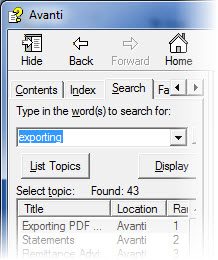
Enter your search term into the box under "Type in the word(s) to search for:" and all pages in the Help system which contain a match to your search term will be included in the list below the Search box. Select any topic in the list and the relevant page will be displayed with all matches within the page highlighted for you.