VAT Rate Date Settings


VAT Rate Date Settings
This window is used to specify VAT rate changes for specific dates. By defining VAT rate changes at specific dates the system will automatically calculate the correct rate on each entry based upon the transaction date you enter.
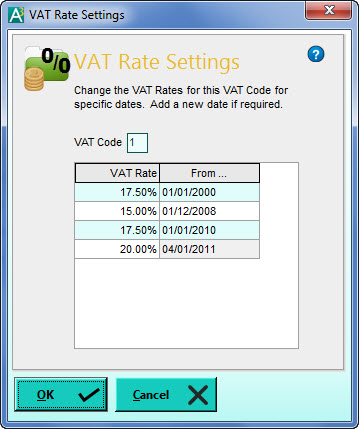
The above screenshot shows the VAT rate periods taking into account the rate changes since 2000 for the UK. Currently (at the time of writing) the standard rate is 20% which took effect from the 4th of January 2011. Before that it was 17.5%. Based on the above settings if you were to enter a transaction dated before the 4th January 2012, the VAT will automatically be calculated at 17.5%, enter a transaction dated on or after the 4th January it will be calculated at 20%.
If a VAT rate change is announced to take effect from a specific date, you can simply add another line into this list, enter the new VAT rate and the date from which it will take effect. To do this click on the last record in the list and press the down-arrow key on your keyboard and a new line will be added for you to enter into. Click OK when you are done.
During the rate changeover period you need not worry about whether transactions you enter will be the old or new rate as the system will calculate the VAT for you based on the transaction date you enter.
If you need to view or make changes to another VAT code simply click on the VAT Code box, enter the VAT code you want and the list of VAT rate changes for that VAT code will be displayed.