Delete a Company


Delete a Company
This option is used to delete a company from the software. It will make a copy of the company's data file and also insist that you take a backup in case you need to restore the company back onto the software in future.
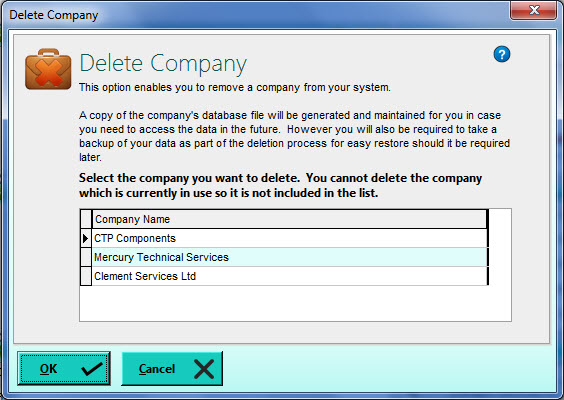
You should select the company in the list that you want to delete. The company which is currently in use in the system will not be included in the list so it cannot be deleted Click to highlight the company and click OK when you are ready.
You will next be informed that you must take a backup of the selected company's data before you can delete it. This is compulsory and you will not be able to proceed with deleting the company until you take a backup. This is to ensure that you have a quick and easy way to restore the company's data file should it be required in the future. Click Yes to take a backup and you will be taken through the Backup procedure. Click here for more information about taking a backup of the company's data file.
Once you have created a backup of your data you will be asked to confirm that you want to delete the company. Click Yes if you want to proceed.
Your company will then be removed from the list of registered companies in the software and it's data file will be deleted from the standard Data folder However the software will make a copy of the company's data file in a sub-folder of the Data folder called Deleted. All copies of company data files which have been removed from the software will be placed in this sub-folder. This newly copied file is a raw copy of the company's data file and cannot be restored using the standard procedure in the software. This copy is kept entirely as a last resort, fail-safe in case you need to restore it however you will require additional assistance to do this (or a "Company Restore" option may be included in a future version). However the safest and easiest way to be able to restore the company's data should it be required is to keep the backup file you created safe.