User Setup


User Setup
The User Setup option is used to create and edit user records for each person who will use the software.
To access this option select File > User Setup from the main menu and select either to Add New User or to Edit Existing User.
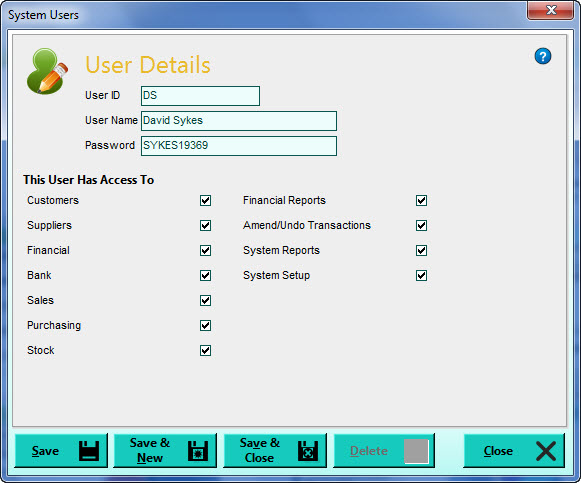
Please note : If you are using a standalone edition of Avanti it is optional to set up any user records however if you do not create any user records then there is no Sign-In process for security purposes. With a standalone edition you can create as many user records as you need for the people who will use the software at different times. For a multi-user edition the number of user records you can create is restricted to the number of user licenses you have purchased.
User ID
Enter the ID that will identify this user when signing-in to the software. All entries this user makes will be "stamped" with this ID. If you have selected to edit an existing user you will be given a magnifying glass to the right of the box which you can click if you want to lookup and find another user's record to edit.
User Name
Enter the full name of the user. This is for reference purposes only.
Password
Enter the password that will allow the user to gain access to the software when signing in. This can be no longer than 10 characters and is forced to uppercase.
This User Has Access To ...
The settings in this section are used to define exactly which parts of the software this user has access to. Ticking a setting allows them access to that section, unticking a setting denies them access to it. For example if you untick the Financial box then any options relating to the Financial section will be denied access for this user. The settings on the right are more specific such as being able to give users access to amending or undoing transactions or to producing Financial Reports.
The most important setting is System Setup. If this setting is ticked it gives the user access to key set up options including the ability to add and amend user records. Other settings they will be able to change include Company Preferences and Company Options such as deleting companies. Therefore it is important that only the person administrating the system and anyone who needs access to these options should have this setting ticked.
Click Save to save any changes, Save & New to save changes and add a new user or Save & Close to save changes and close the User Setup window. You also have a Delete button if you need to remove an existing user record.